
V3 Game Withdrawal
See the archived withdrawal form and learn how to distinguish its fields from transaction status and account verification.
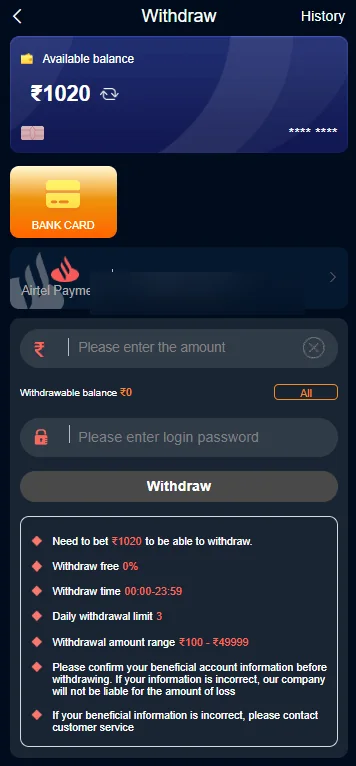
Withdrawal screenshot from November 2024; payment identifier masked for privacy.
QUICK ACCESS
V3 Game Withdrawal – What to know
Clear information, relevant screenshots and practical checks for the topic you selected.
What the historical withdrawal form displays
The archived V3 Game withdrawal screen has a balance area, a bank-card section and a row with a partly obscured payment account. Lower on the screen are fields for an amount and a login password, followed by a large action button. There is also an information panel with several numerical conditions in the original capture.
Those conditions describe what appeared in one interface at one time. They are not verified for the current product, so this page does not repeat historical figures as rules. The screenshot has also been privacy-masked where a payment identifier appears. A public information website should not expose someone’s financial identifiers in an example.
The screen layout helps readers recognize an outgoing-payment form, but it cannot validate a present payment provider or promise that a request will be approved.
Account details and withdrawal credentials
A form may ask users to identify a payment account and confirm a request. Whenever financial information or an account password is involved, the exact website origin matters. Do not enter passwords through a link received unexpectedly in a private message or copy financial details into an unofficial chat.
A masked bank account such as one displaying only its last digits is a different thing from a complete account number. Keep full identifiers private and check them in a verified service environment. If an unfamiliar payee or account suddenly appears, investigate before proceeding.
Do not attempt to bypass eligibility, regional restrictions or identity checks using another person’s account.
Requested, pending and completed are different
A withdrawal request may be created before any payment is processed. Pending, rejected and completed statuses have different meanings and should not be inferred from a single screenshot. The fact that a button was pressed or an amount was entered does not prove a financial result.
When checking a current issue, compare the service’s history record with bank or payment-provider notifications. Dates, time zones and reference IDs matter. Share only the details necessary with verified support, and do not publish credentials or complete bank details.
Someone promising to release a pending payment in return for an additional transfer may be attempting a scam. Verify any rule against official current terms.
Why a form may show an error
An incomplete amount field, unavailable destination, incorrect confirmation credential or server problem could all produce different errors. The historical image cannot tell us which conditions apply today. It is important not to guess from unrelated screenshots or from social-media messages.
If the issue relates to sign-in rather than the transaction, consult V3 Game Login and Account Help. If it concerns the location of the wallet or history tabs, open Wallet. Use the error wording to identify the type of problem before providing any private data.
Use historical images responsibly
The supplied screenshots are helpful for interface identification, but payment terms are especially likely to change. We avoid labeling old fee percentages, thresholds or processing windows as current. Any such details require direct, date-specific verification from the actual provider.
This website does not operate a withdrawal service, cannot reverse a transaction and does not guarantee a payout. Treat all financial claims cautiously and check applicable legal requirements before participating in any money-based gaming activity.
Understanding the archived form fields
The older withdrawal screenshot separates balance information from a linked payment account, an editable amount field and a password confirmation area. These pieces serve different purposes. A balance display is informational, a linked account identifies a destination, an amount field states a requested value and a password field may be used for authentication.
None of those visible components establishes whether the transaction would be accepted, how long it would take or whether particular rules apply now. The screenshot contains historical conditions that may have changed significantly.
We have masked the visible payment identifier in the web version while preserving the form’s structure.
Withdrawal history and request status
The account interface in the supplied image collection includes a withdrawal-history item. This is distinct from the form used to create a request. If a user needs to know what happened to a past request, a dated record with a status is more useful than a screenshot of the form.
Pending should not be confused with approved or paid. A completed service-side status might also need to be compared with information from the payment provider. Never rely solely on a forwarded screenshot as proof of a transfer.
Our website cannot view or confirm individual requests; it only explains the historical labels.
Security when linking a financial account
Linked-account fields may show masked digits so that a user can recognize a destination without exposing it completely. A change in the last digits or payment provider can be a signal to review the account settings carefully.
No legitimate troubleshooting conversation should require you to publish a full bank number, login password and OTP together. An image with those details should be edited before sharing even with someone you believe is a helper.
For this site, we chose to mask the payment identifier in the supplied image. That change does not remove the educational value of the UI example.
Avoiding incorrect assumptions about fees and timing
The old screenshot includes numerical limits and rules, but those figures are tied to the captured date. Copying them into a current article would risk misleading people about withdrawal costs, availability or processing windows.
Instead, the page explains where such rules may appear and what they are meant to describe. A reader should compare any current term against a date-specific, reliable source rather than an old mobile capture.
Financial services and money-based games carry significant risk. This information site does not guarantee payouts, offer special access or recommend making payments to unlock a withdrawal.
A practical distinction between history and help
The older account image contains an item for withdrawal history, while the separate withdrawal screenshot shows a form. A person checking an earlier request needs a history record, not a new blank form. Confusing those screens may lead someone to submit a second request without understanding what happened to the first.
If you cannot identify a status, the next step is to consult verified current support, keeping passwords and complete financial details private. This website does not manage or track requests.
The images help recognize a historical interface; they cannot make a current transaction happen.
If the request details are unclear
If a current screen does not explain whether a form was submitted, avoid assuming the request succeeded. First find the related history record or confirmation within a verified account and compare timestamps before attempting another action.
Never share your sign-in password as a way to prove that a transaction is yours. A reliable support discussion can begin with the displayed issue, date and an appropriately masked reference. This website cannot inspect private payment information, so it cannot authenticate a transaction or guarantee a withdrawal.
Frequently asked questions
Does this page promise a withdrawal time?
No. Processing times are not verified.
Why is the bank information blurred?
Account identifiers in the supplied image were masked to avoid publishing private financial information.
Can this site resolve a withdrawal?
No. It provides historical UI context, not transaction processing.
Not an official operator. No guaranteed results, earnings or payment claims. Screenshots were supplied from 2024; verify current product details and local eligibility.
Looking for V3 Game account information?
Use the relevant page for account access, app questions or screenshots of the older interface.