
V3 Game Register
A simple explanation of the V3 Game registration fields, common form errors and what to verify before creating an account.
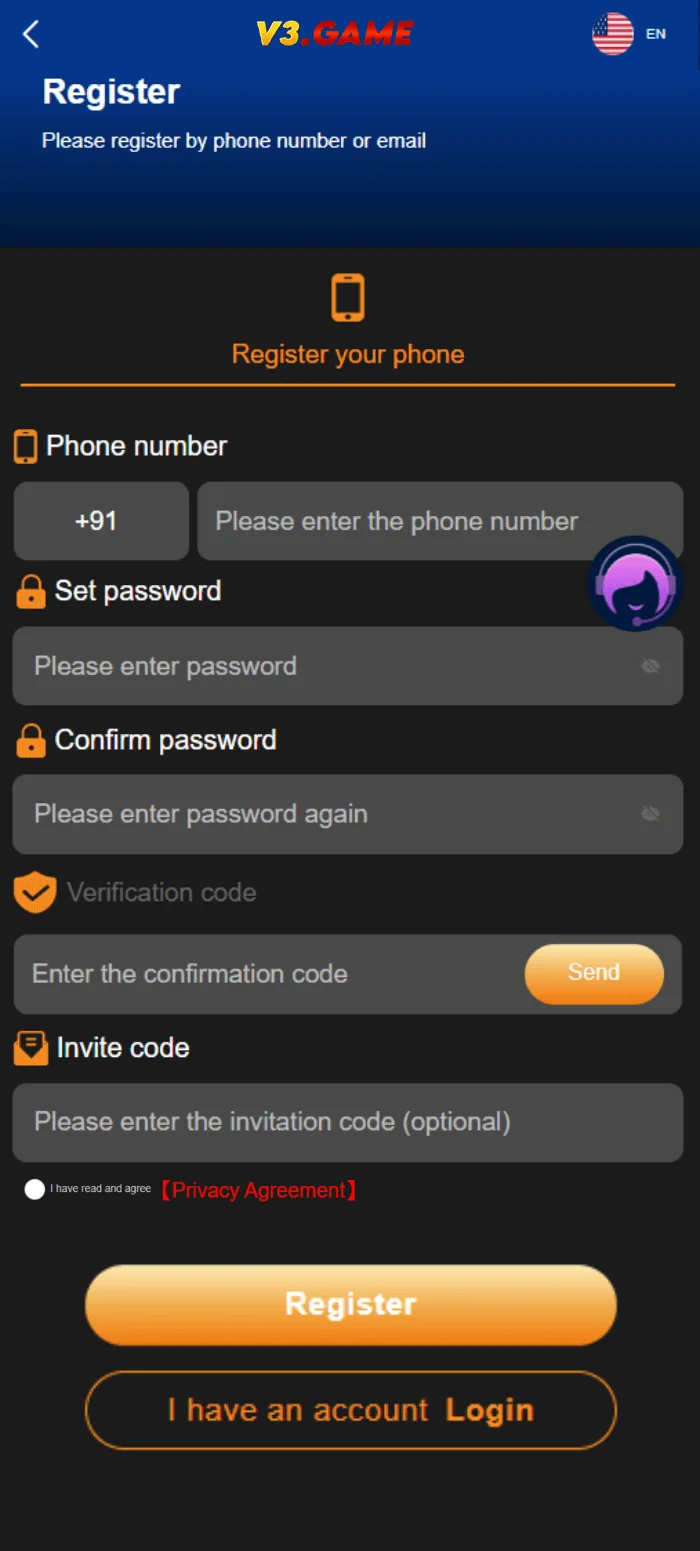
Registration screenshot from November 2024; requirements can change.
QUICK ACCESS
V3 Game Register – What to know
Clear information, relevant screenshots and practical checks for the topic you selected.
Understand the registration form
In the supplied V3 Game Register image, the form is clearly separated into multiple input areas. A phone number field appears near the top. Below it are fields labelled Set password and Confirm password. Lower fields relate to a code and invitation information, with a registration button at the end. This is the historical UI, not a live form on this website.
Before entering a phone number or creating a password on any platform, make sure you know who operates the service, what data is required and whether you can delete an account later. A registration form can look professional even when its ownership or security practices are unclear. The site address, privacy information and independent reputation signals matter more than the visual design of a button.
Not every field is necessarily required today. In some versions a referral or invite code may be optional; in others it may be filled automatically by a particular link. The image cannot establish the current policy or eligibility conditions.
Phone number and verification code
A country-code selector typically indicates the format expected by a phone field. Include the correct country code only when the current interface requests it, and check that the number belongs to you. Avoid using someone else’s number, as it could leave the account dependent on a third party for future recovery.
Verification may involve a code sent by SMS or another channel. The code is temporary and sensitive. Do not forward it to strangers or people claiming to “activate” an account manually. If a code expires, request a fresh one through the legitimate form and review any rate-limit message before retrying.
If no verification message arrives, consider whether the phone has service, messaging is blocked, the number was entered incorrectly or the platform is experiencing a delay. It is unsafe to submit the same number across many look-alike sites just to find one that works.
Set and confirm a secure password
The two password fields are intended to reduce typing mistakes. The confirmation should exactly match the original password, including uppercase letters and symbols. Avoid short predictable strings, names, phone numbers and passwords already used on email or banking accounts.
A password manager can create and store a long unique password. If the current form states specific length or character requirements, follow those actual rules instead of relying on screenshots from 2024. Never put a one-time code in a password field just because a message says it will help registration.
If the confirmation fails repeatedly, type the password in one field at a time and inspect whether a keyboard setting, auto-correct feature or hidden whitespace is changing the entry.
What is the invite code field?
The archived form includes an Invite code label. Such fields can represent a referral relationship or a campaign identifier. They should not be confused with phone-verification codes or account passwords. The presence of a referral field does not mean a reward is guaranteed, nor does it prove a link comes from the official provider.
If an invite code is already filled by a URL, inspect the destination and understand that it may attribute a referral to another party. If you do not know the referrer or cannot verify the terms, do not assume there is a special benefit attached. No invite code is displayed or generated by this information site.
For a closer look at referral fields and code terminology, read the V3 Game Invite Code information page. This is separate from a one-time phone verification code.
Before selecting Register
Look for an age requirement, regional eligibility, terms of use and a description of how information will be handled. Where money-based games are involved, legal restrictions can be significant. Access to a form or advertisement should not be taken as evidence that participation is permitted in your location.
Make sure the complete domain is legitimate, not merely close to a name you recognize. Avoid pages that promise guaranteed earnings or pressure you to deposit immediately after signing up. Read any confirmation screen carefully and keep your account recovery information under your control.
- Read terms and privacy information before submitting details.
- Use your own contact information and a unique password.
- Do not share verification codes, identity documents or payment details through unofficial chats.
After the account form
An accepted form may lead to a login screen, account dashboard or additional verification. Which one appears depends on the current platform implementation and cannot be established from our old screenshots. Save the legitimate website address, not a shortened referral link, if you plan to return later.
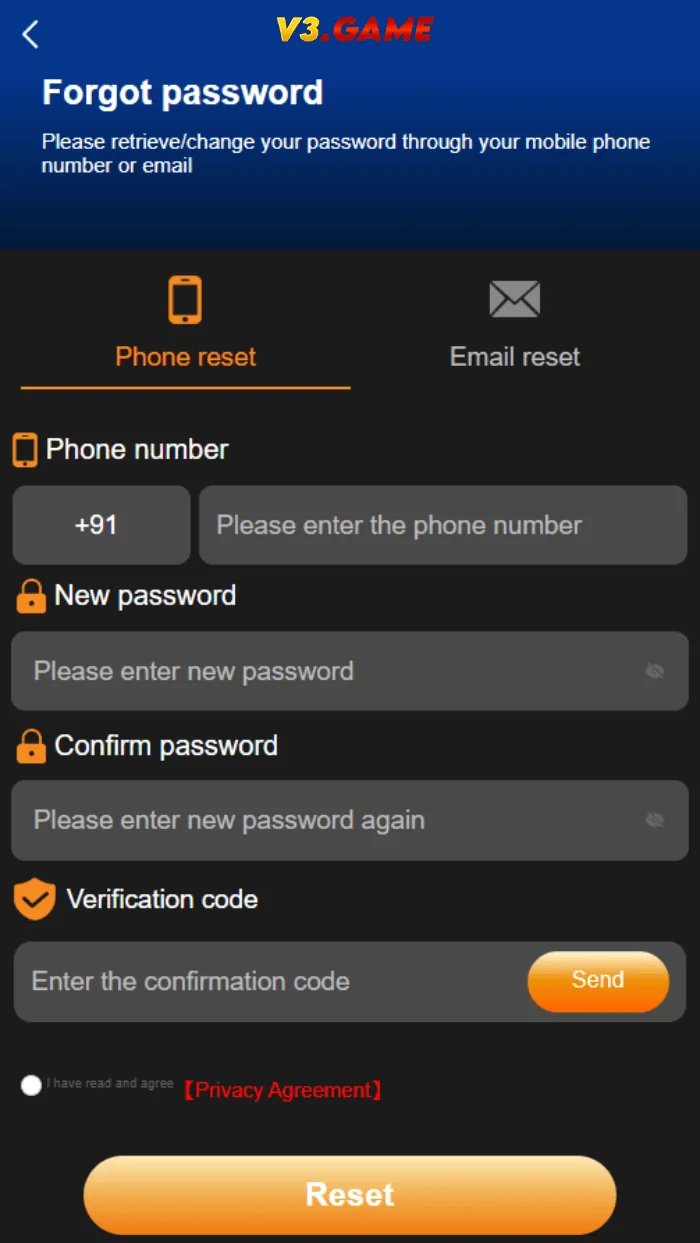
If registration is rejected, record the specific error without disclosing private fields. A duplicate number warning and a verification-code warning are different issues. The V3 Game Login page covers returning users, while Account Help explains password recovery and basic troubleshooting.
The invitation field is explained in more detail on our V3 Game Invite Code.
Referral fields and agency screens are different
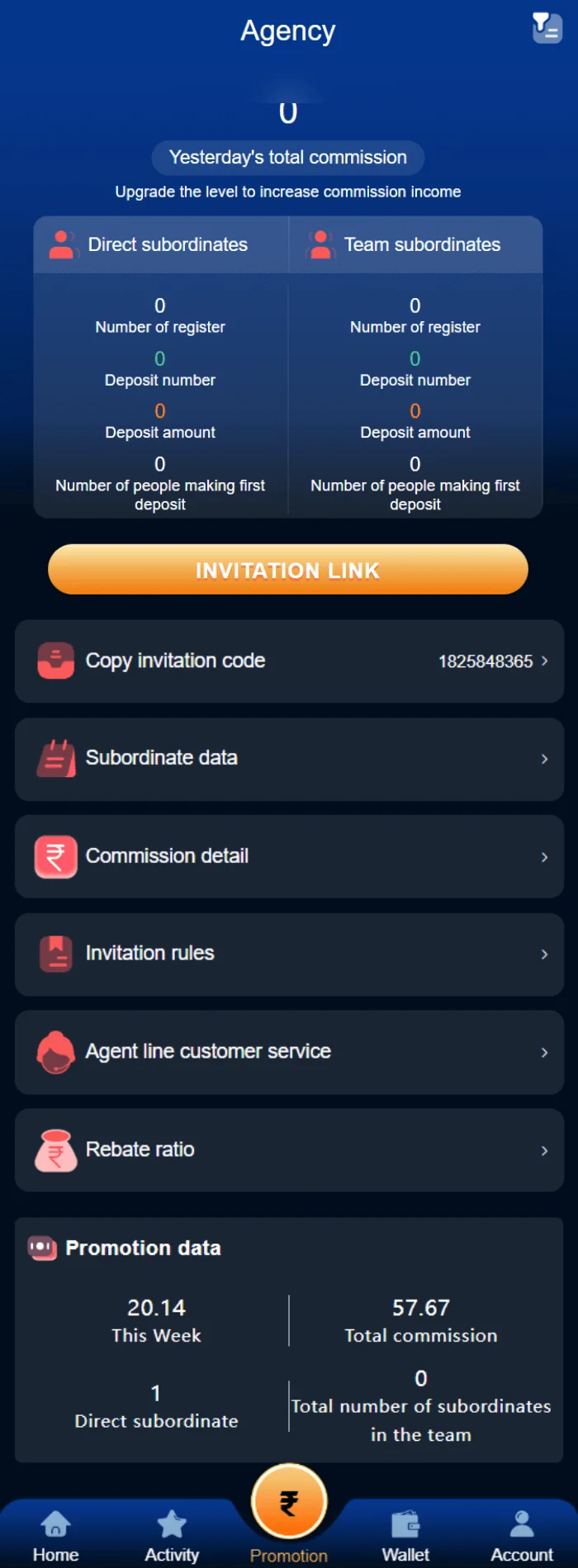
The supplied registration form contains a field labelled Invite code. Separately, the image collection includes an Agency panel with invitation-related and account figures. These are different screens. An invite code in a registration form typically identifies how an account was referred; an agency dashboard may summarize an account’s referral-related activity. Neither screenshot proves that a new user will receive a particular benefit.
An invitation link may contain a tracking or attribution parameter. That is worth recognizing before sharing personal information: the code can connect a registration to a referring account. Avoid assuming that a referral relationship is required or has guaranteed rewards simply because a promotional article says so.
The archived agency screenshot is included below only to help distinguish its context from the registration form. It is not current proof of program eligibility, payout terms or a recruitment opportunity.
Common mistakes when completing a register form
Most form problems can be classified before trying again: an invalid number format, mismatched passwords, an expired verification code or a field that does not match the expected syntax. The error label matters. A mismatch in the confirmation field is not the same as a rejected phone number, and changing an invite code cannot solve a password problem.
Check the visible format and avoid submitting several variations of personal information in rapid succession. For temporary verification messages, request a new code through the verified form only when necessary and do not disclose it. If the registration screen redirects to a different domain unexpectedly, verify that destination rather than continuing automatically.
Never treat a welcome offer as a reason to ignore legal eligibility, privacy terms or a warning from your device.
What happens after registration is a separate step
Account creation may produce a confirmation screen, ask for another verification or return the user to a login page. The supplied registration image does not show the later steps, so we do not invent a universal sequence. If the current platform displays an extra requirement, read the live information carefully before providing further details.
Keep a copy of the legitimate website address and the recovery method linked to your account. A screen that asks you to deposit immediately is not proof that all other steps are complete or that a bonus is guaranteed.
For someone who already has an account, the V3 Game Login page is the correct starting point. For a missing verification code or a forgotten password, use Account Help rather than attempting to register again.
Registration and login are different searches
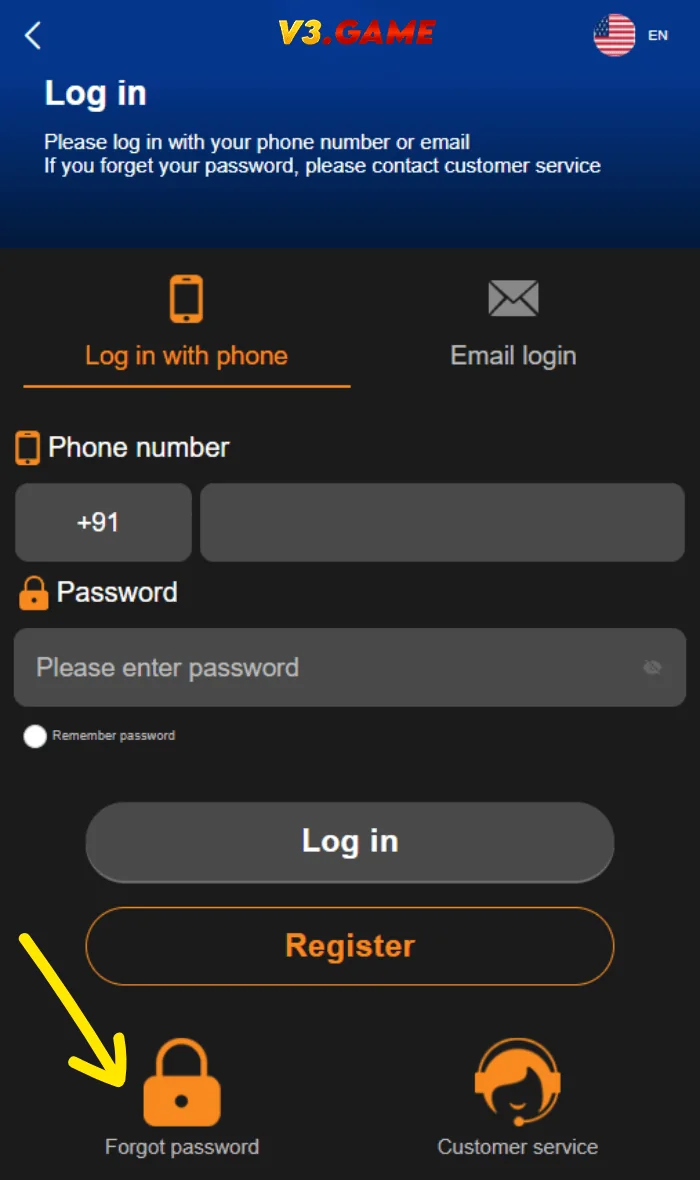
The Register page describes the form used by someone without an account, whereas V3 Game Login covers access to an existing one. If you are looking for password help, the registration form is not the correct place to start. Using a second phone number in an attempt to recover the first account may create confusion rather than restore access. Keep recovery and sign-up requests separate, and follow the appropriate current process.
Related interface screenshots
These are supplied historical screenshots placed alongside the topics they illustrate. Personal identifiers are obscured where necessary.
Frequently asked questions
Is the invite code always required?
The old screenshot shows an invite-code field, but does not prove whether it is mandatory today.
What if the verification code does not arrive?
Check the number, network and current error message; never obtain a code through an unofficial third party.
Can I reuse my old password?
A unique password is safer than one already used on other websites.
Is this a live registration form?
No. This page explains a historical interface and links to the configured external placeholder.
Not an official operator. No guaranteed results, earnings or payment claims. Screenshots were supplied from 2024; verify current product details and local eligibility.
Looking for V3 Game account information?
Use the relevant page for account access, app questions or screenshots of the older interface.