
V3 Game Account Help
Understand the historical account and security screens, plus practical ways to handle common access problems.
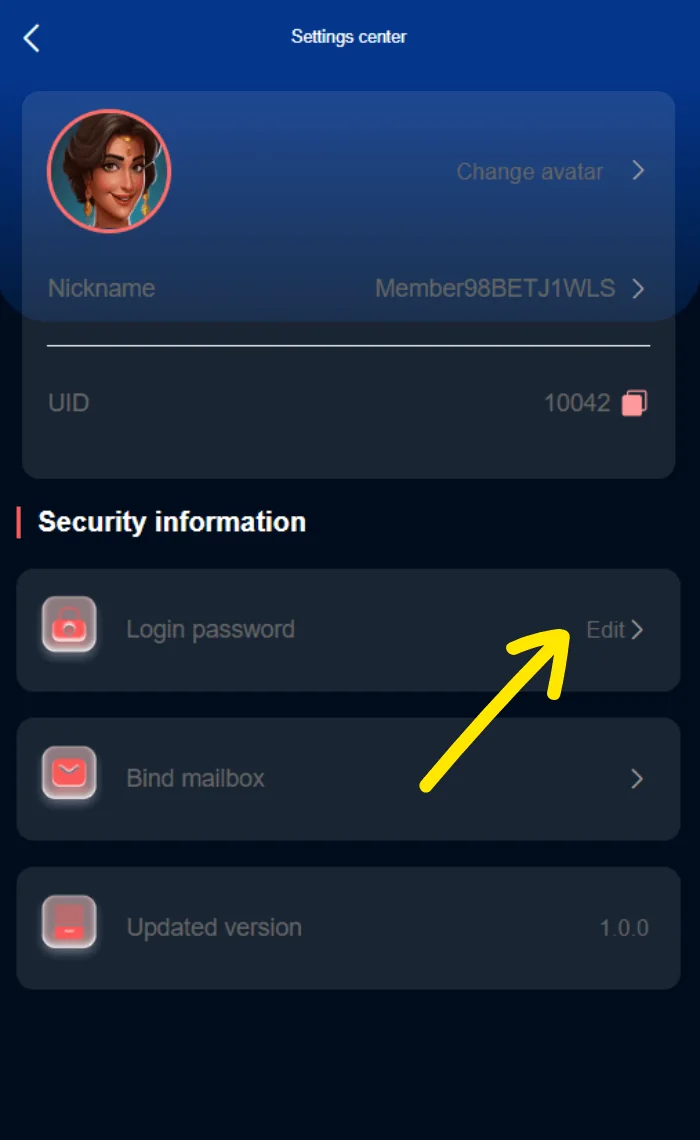
Archived security settings from November 2024.
QUICK ACCESS
V3 Game Account Help – What to know
Clear information, relevant screenshots and practical checks for the topic you selected.
Find the Account and Settings area
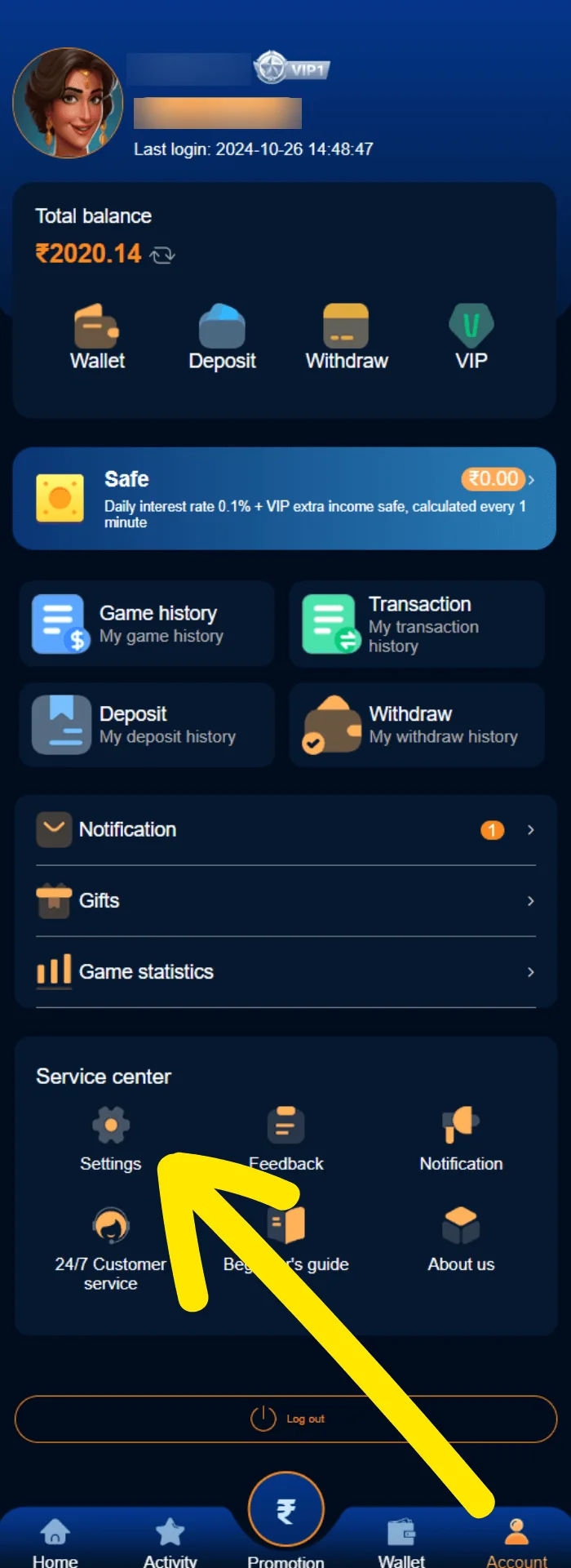
The historical account screen shows a profile area, an account identifier, a balance panel and service-center shortcuts. A separate settings capture displays security information and menu items for Login password and other account controls. The yellow arrow in the reference image highlights the settings route.
On a current product, the exact navigation might have changed, so use visible labels rather than memorizing pixel positions from an old screenshot. If an account page asks for unusually broad permissions or redirects to an unfamiliar domain, stop and verify its origin.
This page does not store profile IDs, usernames, phone numbers or passwords. Account-sensitive portions of the supplied illustrations have been masked in the website assets.
Changing a known password
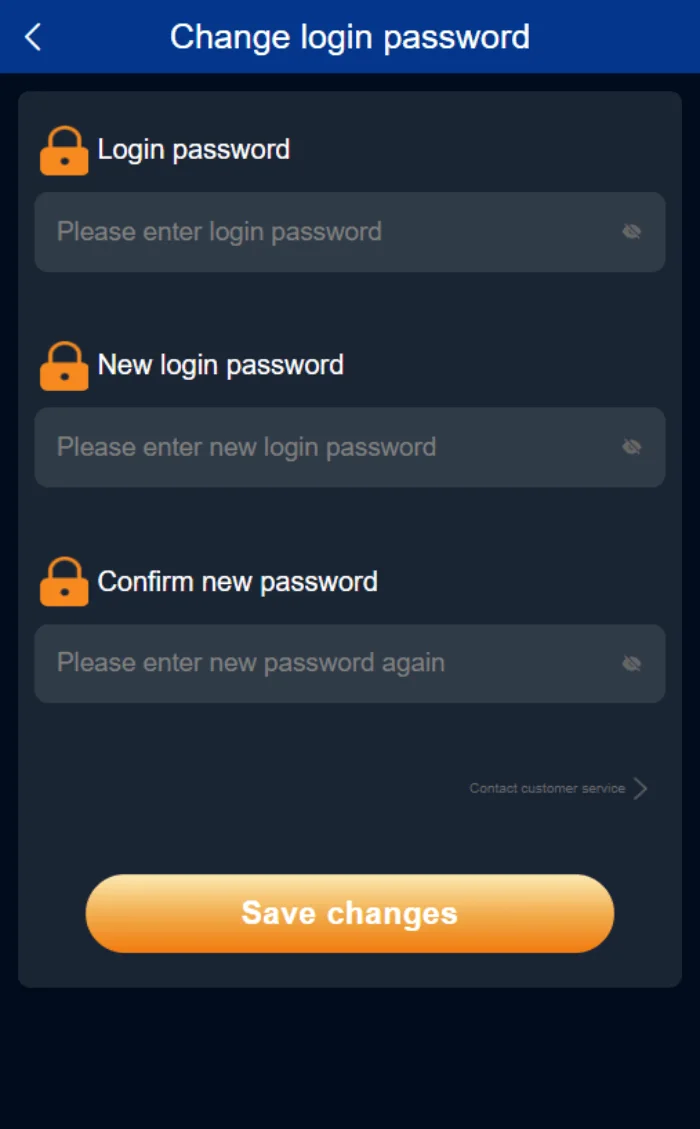
The archived Change login password screen shows three fields: original login password, new login password and confirm new login password. That is a familiar pattern for a password change when someone still knows the current credentials. It is different from recovering a forgotten password, which usually requires ownership verification.
Use a unique new password and check that confirmation matches. Do not rely on a helper who offers to perform a password change for you; they may be trying to obtain the old password or a login code. Once you update a password legitimately, verify whether other sessions remain active and whether the account offers any additional protections.
A screenshot cannot confirm current password requirements or session-management features. Follow the live interface for those details.
Resetting a forgotten password
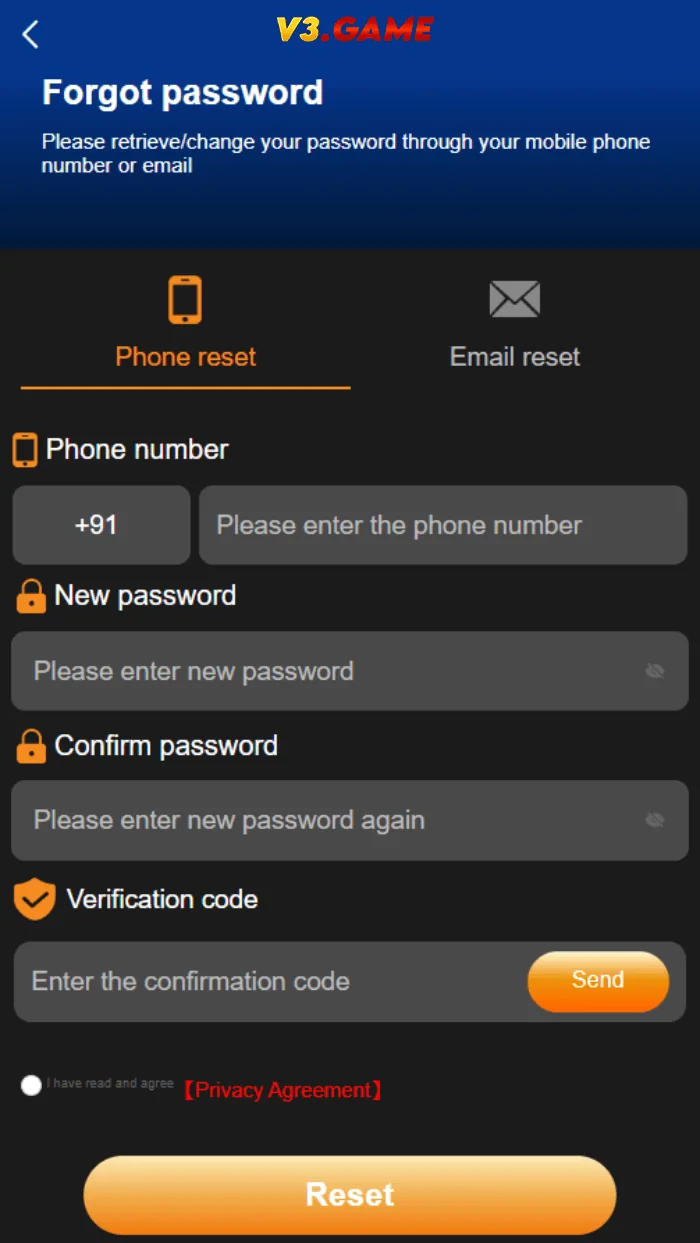
The supplied Forgot password view shows separate recovery tabs and a phone-number form. It asks for a new password, confirmation and a verification code. Use the correct contact method tied to the account and avoid repeated attempts when the interface reports a wait period.
If you no longer control the phone number or email linked to an account, a recovery process may require additional checks. That is a security feature, not automatically an error. Never send a complete identity document or payment card image to an unverified Telegram account merely because someone claims it is the only way to restore access.
If a code arrives unexpectedly when you were not attempting recovery, do not share or use it. Someone else may have entered your number or be trying to access your account.
Understanding OTP and verification issues
A verification code can fail because it has expired, was copied incorrectly, belongs to an earlier request or is being entered in the wrong form. Verify which action the message refers to. A code for registration may not be accepted in a password-reset flow, and vice versa.
Keep the device time correct, check connectivity and allow reasonable delivery time. Do not install third-party SMS interception tools or hand over remote control of your device to receive a code.
If messages repeatedly fail to arrive, record the error text and consult verified support without revealing the code itself.
Recognize unsafe support requests
A legitimate support conversation should be able to begin with a description of the issue, not a request for your password. Beware of people who claim to work for the platform based only on a profile picture, an account badge or a copied logo. It is safer to navigate from a verified service page to its support channel than to rely on unsolicited messages.
Screenshots should be cropped or masked before being sent publicly. Remove phone numbers, email addresses, unique IDs, payment account details and balances if they are not essential. If you must share a technical error, capture the error message rather than the entire private dashboard.
The contact page for this informational site is not a substitute for the service operator’s own account recovery department.
An invite code is not a phone OTP; see V3 Game Invite Code.
When to stop troubleshooting
Repeated errors may indicate maintenance, an account restriction or a site you should not trust. Continuing to retry or submitting more personal data is not always the right next step. If the provider’s identity, terms or support route cannot be verified, do not proceed.
For orientation, the V3 Game Login page covers the sign-in form and the Register page covers the account form. The App page explains the distinction between browser and app access. Use those pages to identify which screen you are actually trying to reach.
What to include in a safe support report
A good technical report includes the page or feature you attempted to use, the visible error message, your device and browser type, and the approximate time. It does not need your password or one-time verification code. If a screenshot is necessary, mask account IDs, balance amounts and bank details before sharing.
Do not send sensitive information to a profile that contacts you first and claims to be support. Verify the contact route from the service’s own trustworthy pages. Unexpected requests for screen sharing or remote-device access can expose much more than the specific account issue.
If the issue appears related to a financial transaction rather than authentication, the Wallet and transaction-screen information pages offer a more appropriate starting point.
Review account activity when something looks wrong
An unexpected password-reset message or login notification can mean someone else is attempting access. Do not forward the message or approve an action you did not initiate. Check the verified service directly and change any reused credentials on other websites if there is reason to believe they were exposed.
The historical account screenshot includes several history-related labels. Such records can be helpful when available, but they may not show every security event. Prefer current account controls and legitimate support documentation for investigating suspicious activity.
This informational website cannot inspect private accounts and does not maintain a login database.
A short checklist for safer account recovery
Before asking anyone to restore access, check that you are using the correct account identifier and a verified page. Distinguish a password error from an unavailable-site error, and make sure the recovery code belongs to the action you initiated. If the process is not working, keep the error message without sharing private values.
Never provide remote screen control or disclose SMS codes to a person claiming to be technical support. If a request for account recovery turns into an unexpected transfer of funds or a demand for unrelated documents, stop and verify the operator’s legitimate contact information.
For returning users, the V3 Game Login page includes the historical sign-in screenshot. For the original account creation form, the V3 Game Register page is a better match.
Keep the account and payment issues separate
Account recovery is an authentication problem. A missing transaction is a record or payment problem. Although both may appear in the same account area, they require different information and different checks. An account-recovery conversation should never require payment as proof of identity, and a transaction inquiry should not require disclosing a login password.
The supplied historical screenshot collection makes those sections visibly distinct. We have placed the respective images on dedicated pages so users are not directed to the wrong part of an interface.
Related interface screenshots
These are supplied historical screenshots placed alongside the topics they illustrate. Personal identifiers are obscured where necessary.
Frequently asked questions
What is the difference between change and reset password?
Changing typically uses a known current password; resetting generally uses account verification when the password is forgotten.
Should I share an OTP with support?
No. Keep one-time codes private.
Can this website recover my V3 Game account?
No. This is an independent information website and cannot access or restore accounts.
Not an official operator. No guaranteed results, earnings or payment claims. Screenshots were supplied from 2024; verify current product details and local eligibility.
Looking for V3 Game account information?
Use the relevant page for account access, app questions or screenshots of the older interface.